Intelligent Restaurant Automation

Restaurant AI That Takes Orders, Books Tables & Serves Customers 24/7

Add Aedan Rose to your website and mobile app to automate online ordering, reservations, and customer service. Our AI chatbot handles everything from menu questions to order modifications—so your staff can focus on what matters most.

FEATURES:
AI Chatbot for Web & App • Smart Reservation System • 24/7 Automated Customer Service
30% Faster Orders
50% Fewer Phone Calls
24/7 Web & Mobile
Instant Response
TRANSPARENT PRICING
Plans from $0 to $379/mo
See all plans
100+
Languages Supported
5
AI Agents Working Together
24/7
AI Availability
Google
Cloud Powered

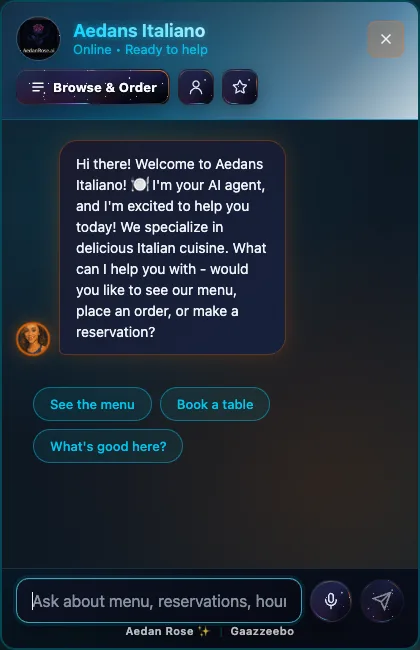
► Live AI Demo

Experience Aedan Rose in action. This is connected to our real backend and powered by advanced Aedan Rose AI technology.

Backend API
Checking...
Aedan Rose AI
Checking...
Firestore DB
Checking...
Restaurant Data
Checking...

► Try asking: "What's your most popular dish?" or "Can I make a reservation for tonight?"

3 Core Capabilities

Everything Your Restaurant Needs

One platform. Complete control. Zero headaches.

24/7 AI Service

1000+ conversations simultaneously

Never miss a customer. Aedan Rose handles reservations, orders, and questions around the clock with perfect accuracy.

Instant responses, zero wait time
78% conversion rate
Multi-language support

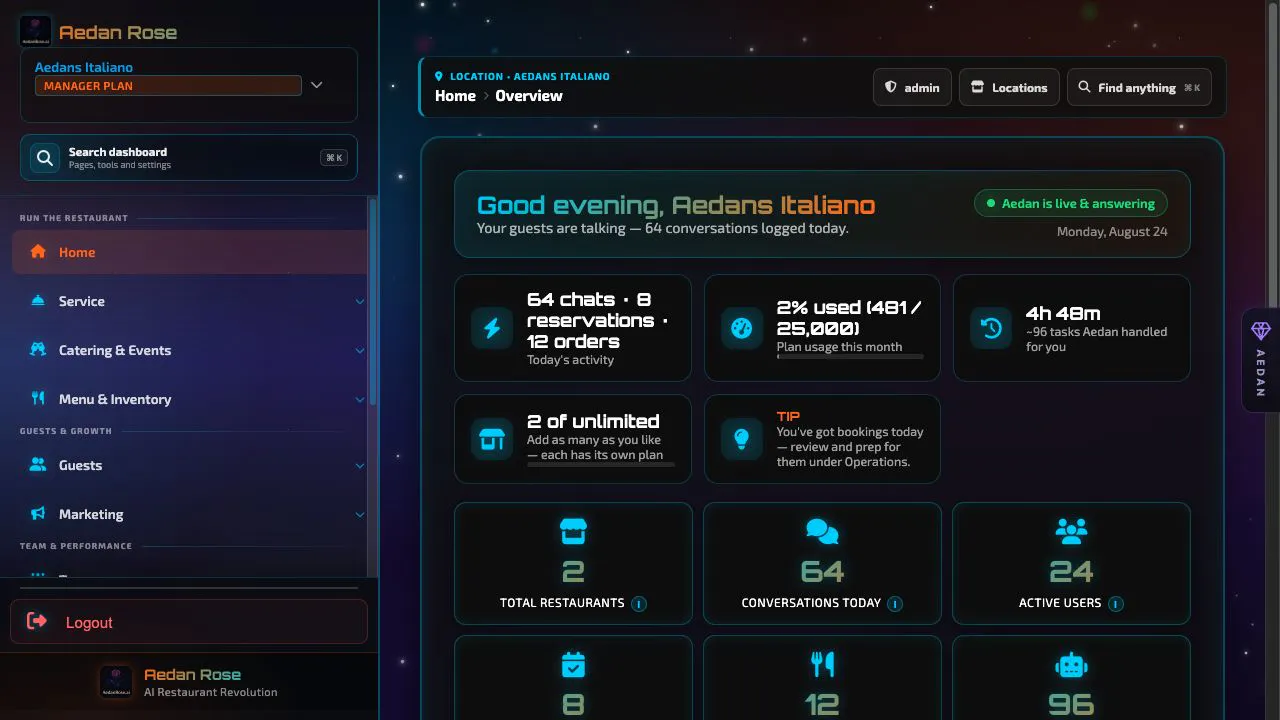
Analytics Dashboard

60+ KPIs tracked in real-time

See every metric that matters. Revenue, orders, customer sentiment, and AI performance in one beautiful dashboard.

Revenue intelligence & forecasting
Customer behavior insights
Peak time optimization

Employee Management

78+ employee roles supported

Complete team control. Smart scheduling, shift trading, real-time chat, and role-based permissions for your entire staff.

Intelligent scheduling system
Live team chat & trading
Performance analytics

Choose Your Aedan Rose Plan

Start free and scale as you grow. All plans include AI-powered conversations, team management, and email support.

Monthly
Yearly Save 20%

Free

$ 0 /month

Perfect for testing Aedan Rose's capabilities

Quick Benefits

  • Test all core features
  • No credit card required
  • 25 conversations included
  • Setup in 10 minutes
25 AI conversations/month
3 employee accounts
280 emails/month
Gemini 2.0 Flash Lite AI
Team scheduling
Key Performance Indicators (KPIs)
1 menu upload (PDF)
Email support (48-hour response)

Starter

$ 28 /month

For small restaurants getting started

Quick Benefits

  • 20x more conversations (vs Free)
  • Gemini 2.0 Flash + 2.0 Flash Lite
  • Team of 5 employees
  • Email schedule distribution
500 AI conversations/month
5 employee accounts
440 emails/month
Gemini 2.0 Flash + 2.0 Flash Lite
Team scheduling & group chat
Task management system
Multiple menu uploads
KPIs + Revenue Analytics
Customer memory & preferences
Email support (48-hour response)

Need More? Add-Ons Available

All plans can be customized with add-ons to fit your exact needs

Extra Employees

Expand your team capacity

$5/month

per employee

Save $10/year with annual billing

Extra Conversations

Scale your AI capacity

$8/month

per 100 conversations

Save $16/year with annual billing

Extra Emails

Increase email capacity

$5/month

per 100 emails

Save $10/year with annual billing

Unlimited Add-Ons Available

All plans support unlimited add-ons. Scale your conversations, employees, and emails as much as you need.

Complete Feature Comparison

See exactly what you get with each plan - no hidden features

FEATURE
Free
$0
/month
Starter
$28
/month
POPULAR
Professional
$79
/month
Growth
$139
/month
Business
$229
/month
Enterprise
$379
/month

Core Resources & Limits

AI Conversations/Month
Automated customer interactions powered by conversational AI for reservations, inquiries, and support.
25 500 1,500 5,000 10,000 20,000
Employee Accounts
Staff management system with role-based access for managers, servers, and hosts.
3 5 10 15 25 50
Emails/Month
Automated email notifications for reservation confirmations, reminders, and marketing campaigns.
280 440 1,000 2,500 5,000 8,000
AI Training Limit Quota
Custom AI training documents to teach your chatbot about menus, policies, and restaurant-specific knowledge.
5 docs 20 docs 50 docs 120 docs 250 docs 440 docs
Add-Ons Available
Scalable feature upgrades to expand AI conversations, emails, and employee accounts as your business grows.
Table Management System (50 Tables)
5 Table Types: Standard • Booth • Bar Seating • Patio • Private Room
Features: Capacity management • Location tracking • Type categorization • Search & filter
VIP Sections & Bottle Service (50 Sections)
9 Categories: VIP • Private Rooms • Bar/Lounge • Outdoor • Entertainment • Events • Dining • Specialty • Custom
Features: Bottle service minimums • Hourly rates • Full upfront Stripe payments • Overnight venue support

AI Models & Technology

AI Models
Advanced language models powered by Google Gemini for natural conversation and intelligent responses.
Gemini 2.0 Flash Lite 2.0 Flash Lite + 2.0 Flash 2.0 Lite + 2.0 + 2.5 Flash 2.0 Lite + 2.0 + 2.5 Flash All Flash + 2.5 Pro All Flash + 2.5 Pro
Multi-language Support (100+)
Global multilingual chatbot that communicates with customers in their native language automatically.
Customer Memory & Preferences
Personalized guest experience with AI that remembers dietary restrictions, seating preferences, and past orders.
Multi-Agent AI Architecture
Intelligent task routing with specialized AI agents for reservations, menu questions, and customer service.

Analytics & Insights

Key Performance Indicators (KPIs)
Restaurant performance dashboard tracking reservations, covers, and conversion metrics in real-time.
Revenue Analytics
Financial reporting tools to track revenue trends, average ticket size, and booking value analysis.
Customer Behavior Analytics
Guest insights and patterns showing booking habits, repeat visits, and customer segmentation data.
Real-Time Monitoring
Live activity tracking with instant updates on AI conversations, bookings, and customer interactions.
Engagement Analytics
Chatbot interaction metrics measuring response rates, conversation quality, and customer satisfaction scores.
Peak Time Patterns
Rush hour analytics identifying busiest periods for optimized staffing and inventory planning.
Top Performance Insights
Best-performer reports highlighting top menu items, highest-revenue time slots, and successful campaigns.
Customer Feedback & Satisfaction
3 Analytics Tabs: Overview, Sentiment Analysis, AI Insights for comprehensive guest feedback tracking.

Team Management

Team Scheduling
Restaurant staff scheduling software with drag-and-drop shift management for servers, hosts, and kitchen staff.
Group Chat
Team communication platform for instant messaging, announcements, and shift coordination.
Shift Trades/Swaps/Coverage
Employee shift swap system enabling staff to trade shifts with manager approval workflow.
Role-Based Permissions (6 roles)
Access control system with Owner, Manager, Server, Host, Kitchen, and Custom role permissions.
Task Management System
Daily operations checklist software with recurring tasks, priority levels, and manager verification workflows.
Features: Checklists • Position-based assignments • Progress tracking
Direct Messaging
Private 1-on-1 employee messaging with read receipts and real-time WebSocket delivery.
Features: Instant notifications • Message history • Mobile-friendly

Support & Services

Regular Customer Support
Dedicated help desk for troubleshooting, setup assistance, and general platform questions.
48-hour response 48-hour response 24-hour priority 12-hour priority 8-hour priority 4-hour priority
Priority Dev Support
Technical engineering support for API integrations, custom configurations, and advanced troubleshooting.
48-hour response 48-hour response 24-hour priority 12-hour priority 8-hour priority 4-hour priority
Priority Internal Customer Support
VIP account management with dedicated success managers for onboarding and optimization.
48-hour response 48-hour response 24-hour priority 12-hour priority 8-hour priority 4-hour priority
6 Core Features

What Aedan Rose Actually Does

Built and tested features that work today. No fluff, no promises, just honest capabilities.

Meet Aedan Rose: Conversation Expert

"I love talking to your customers." Aedan Rose is powered by 5 AI agents working as one intelligent team to have real conversations that convert.

Multi-agent architecture (orchestrator, reasoning, flow manager)
Tiered AI models (Gemini 2.0 Flash to 2.5 Pro)
Session-based conversation memory
Real-time WebSocket messaging
Learn More See Demo

Meet Raguel: Reservations Manager

"I never double-book a table." Raguel captures bookings 24/7, sends perfect reminders, and keeps your calendar spotless.

Table availability tracking
Confirmation number system
Email notifications via SendGrid
Special requests handling
Learn More See Demo

Meet Remiel: Analytics Expert

"I spot patterns you'd miss." Remiel is your super genuine, helpful data expert who reveals hidden revenue opportunities.

Real-time dashboard updates
Peak times analysis
Customer pattern tracking
Revenue and performance metrics
Learn More See Demo

Meet Michael: Team Coordinator

"I keep your team running smoothly." Michael is your AI team leader who handles scheduling, task management, group chat, and team coordination.

Task management with checklists & assignments
Real-time group chat & direct messaging
Drag-and-drop shift scheduling
Shift trades & coverage requests
Learn More See Demo

Meet Raphael: Menu Expert

"I know every dish by heart." Raphael is your AI menu healer and guide—helping customers find the perfect meal.

PDF menu processing
Terminology extraction
Training quota by plan
Menu synchronization
Learn More See Demo

Meet Gabriel: Billing Manager

"I keep pricing transparent." Gabriel delivers clear, honest pricing with no hidden fees, no contracts, and no surprises.

Free to Enterprise plans
Add-on billing system
Usage tracking
Automatic Stripe webhooks
Learn More See Demo
CURRENT INTEGRATIONS & API

Verified Integrations

Aedan Rose integrates with select partners. More integrations coming in 2025.

Stripe

Secure payment processing and subscription management

  • PCI DSS Level 1 compliant
  • Automated billing and invoicing
  • Webhook event handling
  • Multiple payment methods
Verified Integration

SendGrid

Reliable email delivery for reservations, orders, and team communications

  • Email templates for confirmations
  • Bulk email capability
  • Delivery tracking
  • Usage analytics
Verified Integration

Integrations & Developer Tools

Ready-made integrations and custom development options. Need advanced API access? Our team is here to help.

  • Drop-in widget integration
  • Pre-built POS connectors
  • Basic API endpoints
  • Advanced API (request access)
Request Advanced Access
MULTI-AGENT AI SYSTEM

Neural Intelligence Network

Five specialized AI agents working together to power your restaurant operations

Conversation AI

Natural dialogue

Knowledge Base

Memory & context

Analytics Engine

Data insights

Decision Engine

Smart routing & logic

Action Executor

Task execution

Real-time neural connections showing AI agent communication

Need a Custom Integration?

Our team builds custom integrations tailored to your restaurant's unique systems. Basic API access included, advanced features available on request.

Contact Integration Team View Integration Guide
Setup & Training

Simple Setup & Training Process

No technical skills required - just 4 easy steps

Upload Your Documents

Just drop your existing PDFs - no typing or data entry required

Drag & drop your files here

Menu.pdf
About-Us.pdf

What to Upload:

Menu PDF

Prices & descriptions

About PDF

Hours, story & policies

AI Training Process

Watch as Aedan Rose learns your menu, brand, and policies in minutes

Training AI on your documents... 75%

Analyzing menu items
Learning restaurant details
Building knowledge base

What Aedan Rose Learns:

  • Every menu item with ingredients and prices
  • Restaurant hours and location
  • Your brand voice and policies
  • Dietary options and allergen info
Typical training time: 5-10 minutes

Get Your Widget Code

Script Embed (Developer Method)

Most powerful option - full customization and features

Copy & Paste This Code
<script src="https://aedanrose.ai/widget.js" data-restaurant-id="your-id" data-primary-color="#667eea"> </script>
Best for: Custom websites, developers, full control over styling
Easiest

iFrame Embed (No-Code Method)

Simplest option - works everywhere, no technical knowledge needed

Copy & Paste This iFrame
<iframe src="https://aedanrose.ai/chat/your-id" width="100%" height="600px" frameborder="0"> </iframe>
Best for: Quick setup, website builders, non-technical users

Where is your restaurant website hosted?

Choose your platform for step-by-step installation instructions

WordPress

Most popular CMS

Squarespace

All-in-one platform

Wix

Drag & drop builder

Shopify

E-commerce platform

Weebly

Simple site builder

GoDaddy

Website Builder

Other / Custom

Use Script Embed

WordPress Installation Guide
Your widget code:
<script src="https://aedanrose.ai/widget.js" data-restaurant-id="your-id"></script>
1
Login to WordPress Admin

Go to your website URL followed by /wp-admin (e.g., yoursite.com/wp-admin) and log in with your administrator credentials.

Don't have admin access? Contact your web developer or hosting provider.
2
Navigate to Theme Editor

In the left sidebar, hover over "Appearance" and click "Theme Editor"

You may see a warning about editing theme files - this is normal. Click "I understand" to proceed.
3
Select Footer Template File

On the right sidebar, look for "Theme Files" and click on footer.php

If you don't see footer.php, try looking for theme.html or index.php
4
Find the Closing Body Tag

Use Ctrl+F (or Cmd+F on Mac) and search for </body> in the file

<!-- Other footer code above --> <script src="https://aedanrose.ai/widget.js" data-restaurant-id="your-id"></script> </body> ← Paste ABOVE this line
5
Paste Your Widget Code

Place your cursor on a new line JUST ABOVE </body> and paste the Aedan Rose widget script

6
Click "Update File"

Scroll to the bottom and click the blue "Update File" button to save your changes

7
Visit Your Website

Open your website in a new tab. Within 5-10 seconds, you should see the Aedan Rose widget appear in the bottom-right corner.

✓ Verification: The chat widget should be visible with your restaurant's branding
Common Mistakes to Avoid
  • ❌ Don't paste in header.php - use footer.php
  • ❌ Don't paste AFTER </body> - paste BEFORE it
  • ❌ Don't forget to click "Update File"
Troubleshooting

Widget not appearing? Clear your browser cache (Ctrl+Shift+R) and refresh the page.

Still not working? Check if there are any JavaScript errors in the browser console (F12 key).

Squarespace Installation Guide
Your widget code:
<script src="https://aedanrose.ai/widget.js" data-restaurant-id="your-id"></script>
1
Login to Squarespace

Go to squarespace.com and log in to your account, then click on your website

2
Open Settings Menu

In the left sidebar, click the gear icon or "Settings" link at the bottom

3
Navigate to Advanced Settings

Click on "Advanced" in the settings menu, then select "Code Injection"

Code Injection is only available on Business plans and higher
4
Paste in Footer Section

You'll see two boxes: "Header" and "Footer". Paste your Aedan Rose widget code in the Footer box

Don't paste in Header - always use Footer for best performance
5
Click Save

Click the "Save" button in the top-right corner of the page

6
View Your Live Site

Click "View Site" or open your website in a new tab. The widget appears instantly - no publishing needed!

✓ Verification: Widget should load on all pages of your site
Common Mistakes to Avoid
  • ❌ Using the Header box instead of Footer
  • ❌ Forgetting to click Save
  • ❌ Not having a Business plan or higher
Troubleshooting

Don't see Code Injection? You need to upgrade to a Business plan or higher.

Widget not showing? Wait 30 seconds and hard refresh (Ctrl+Shift+R).

Wix Installation Guide
Your widget code:
<script src="https://aedanrose.ai/widget.js" data-restaurant-id="your-id"></script>
1
Open Wix Editor

Log in to Wix and click "Edit Site" on your restaurant's website

2
Click the Add Button (+)

On the left sidebar, click the large "Add" button (+ icon)

3
Select Embed

Scroll down and click "Embed" then choose "Custom Embeds"

4
Choose "Embed a Widget"

Click the "Embed a Widget" option (looks like a code icon)

5
Paste Your Code

A box will appear. Click "Enter Code" and paste your Aedan Rose widget script in the "Add your code here" field

6
Position the Widget

Drag the widget element to the bottom-right corner of your page. You can resize it if needed.

Set width to about 350px and height to 500px for best appearance
7
Publish Your Site

Click "Publish" in the top-right corner to make the widget live

✓ Verification: Visit your live site to see the widget in action
Common Mistakes to Avoid
  • ❌ Choosing "Embed HTML" instead of "Embed a Widget"
  • ❌ Making the widget too small to read
  • ❌ Forgetting to publish after adding
Troubleshooting

Widget looks broken? Make sure you chose "Embed a Widget" not "Embed HTML".

Can't see the widget? Check that you published your site and cleared your cache.

Shopify Installation Guide
Your widget code:
<script src="https://aedanrose.ai/widget.js" data-restaurant-id="your-id"></script>
1
Login to Shopify Admin

Go to your Shopify admin dashboard at yourstore.myshopify.com/admin

2
Navigate to Online Store

In the left sidebar, click "Online Store" then click "Themes"

3
Click Actions → Edit Code

Find your current theme (under "Current theme"), click the "Actions" dropdown, and select "Edit code"

Recommended: Click "Duplicate" first to create a backup before editing
4
Open theme.liquid File

In the left sidebar under "Layout", click on theme.liquid

5
Find the </body> Tag

Press Ctrl+F (Cmd+F on Mac) and search for </body>

<!-- Other Shopify code --> <script src="https://aedanrose.ai/widget.js" data-restaurant-id="your-id"></script> </body> ← Paste ABOVE here
6
Paste Widget Code

Click on the line just ABOVE </body> and paste your Aedan Rose widget script

7
Click Save

Click the green "Save" button in the top-right corner

8
View Your Store

Click "View your store" or open your live store in a new tab to see the widget

✓ Verification: Widget appears on all pages immediately
Common Mistakes to Avoid
  • ❌ Editing the wrong theme (make sure it's your active theme)
  • ❌ Pasting in the wrong file (use theme.liquid, not a section file)
  • ❌ Not clicking Save after pasting
Troubleshooting

Widget not appearing? Make sure you edited the CURRENT active theme.

Broke your theme? Restore from the backup you created in step 3.

Weebly Installation Guide
Your widget code:
<script src="https://aedanrose.ai/widget.js" data-restaurant-id="your-id"></script>
1
Login to Weebly

Go to weebly.com and log in, then select your restaurant website

2
Click Settings

In the top menu, click the "Settings" tab

3
Navigate to SEO

In the left sidebar, click on "SEO"

4
Scroll to Footer Code

Scroll down until you see the "Footer Code" section

There's also a "Header Code" box - make sure you use Footer Code
5
Paste Your Script

Click in the Footer Code text box and paste your Aedan Rose widget script

6
Save Changes

Click the "Save" button at the top or bottom of the page

7
Publish Your Site

Click the "Publish" button in the top-right corner to push your changes live

✓ Verification: Open your site and look for the chat widget
Common Mistakes to Avoid
  • ❌ Using Header Code instead of Footer Code
  • ❌ Saving but not publishing
  • ❌ Pasting in the wrong text box
Troubleshooting

Widget not showing? Make sure you clicked Publish, not just Save.

Still having issues? Try clearing your browser cache and refreshing.

GoDaddy Website Builder Installation Guide
Your widget code:
<script src="https://aedanrose.ai/widget.js" data-restaurant-id="your-id"></script>
1
Login to GoDaddy

Go to godaddy.com and sign in to your account

2
Open Your Website

Click "My Products" → "Websites + Marketing" → "Edit Website" or "Edit Site"

3
Navigate to the Page

Go to the page where you want the widget to appear (usually your homepage or all pages)

4
Add a Section

Click the "Add Section" button (usually a + icon) and choose "HTML" from the options

If you don't see HTML, look for "Custom Code" or "Embed"
5
Paste Your Code

An HTML editor will appear. Paste your Aedan Rose widget script in the code editor

6
Position the Section

Drag the HTML section to the bottom of your page (footer area) for best results

7
Publish Your Site

Click "Publish" in the top-right corner to make your widget live

✓ Verification: View your published site to see the widget
Common Mistakes to Avoid
  • ❌ Adding as text instead of HTML/Custom Code
  • ❌ Placing the section at the top instead of bottom
  • ❌ Not publishing after adding
Troubleshooting

Can't find HTML option? GoDaddy may call it "Custom Code" or "Embed" - look for those.

Widget not appearing? Make sure you published (not just saved as draft).

Connect Payments (Stripe)

One-click Stripe setup to accept payments through your AI assistant

Stripe Connect with Stripe
1

Click Connect

2

Authorize Stripe

3

Start Accepting Payments

Payment Benefits:

  • Accept credit & debit cards
  • You get 100% of your menu prices
  • Secure PCI-compliant processing
  • Automatic payouts to your bank
Get Started Today

Ready to Transform Your Restaurant?

Get Aedan Rose up and running in minutes. Setup is easier than making coffee.

Choose Your Setup Experience

DIY Setup

2 minutes

Less than 5 lines of code - easier than installing Google Analytics

Iframe Embed

30 seconds

One-line embed code - copy, paste, done!

24/7 Support

Always

Our team ensures Aedan Rose performs perfectly

What Aedan Rose Does For Your Restaurant

5 specialized AI agents working together
True semantic understanding (not keyword matching)
AI confidence scoring (0.0-1.0) for every extraction
Intelligent reservation management with timezone awareness
Conflict prevention & double-booking protection
Order processing with 5-strategy fuzzy menu matching
Real-time revenue analytics with AI forecasting
Customer intelligence & behavior analytics
AI performance monitoring & optimization
Email analytics & usage tracking
Intelligent scheduling with shift trading
4-role permission system (admin, manager, server, hostess)
Real-time team chat (WebSocket-powered)
Dual database strategy (Firestore + PostgreSQL)
Multi-tier caching for sub-second performance
Real-time WebSocket updates (no polling delays)
Remembers customer preferences & history
Works 24/7 on website and mobile
Drag-and-drop PDF menu upload
Multi-language support framework

Get Aedan Rose For Your Restaurant

Setup in minutes, not hours. We're confident you'll love it.

Setup in minutes
24/7 support included

Meet Aedan Rose: See Your AI Team Member in Action

2 minutes to setup. Instant boost to revenue & customer satisfaction.

The Restaurant Industry Revolution: Stay Ahead or Get Left Behind

Every moment without Aedan Rose's advanced AI ecosystem, you're hemorrhaging revenue while competitors capture your market share.

Market disruption is happening NOW

Traditional Restaurant Challenges

The costly reality of outdated operations

Slow Response Times Lost customers to faster competitors
Human Error Frequency Order mistakes damage reputation
Staff Limitations Capacity constraints reduce revenue
Operating Hour Restrictions Missing overnight revenue opportunities
Inconsistent Service Quality Variable customer experiences

Aedan Rose's AI-Powered Revolution

The competitive advantage that changes everything

Instant AI Response Sub-second customer interaction
100% Order Accuracy AI precision eliminates mistakes
Unlimited Capacity Handle infinite concurrent customers
24/7/365 Availability Never miss a revenue opportunity
Flawless Execution Consistent 5-star experiences

Market Reality: Your Competition is Already Advancing

Forward-thinking restaurants are implementing AI systems today. Every day you delay gives competitors more market share, customer loyalty, and revenue growth. Aedan Rose provides the technological superiority needed to dominate your local market.

Revenue loss per day of delay
Customers switching to AI-enabled competitors
Market positioning advantage slipping away

Your Restaurant Management: Before vs After Aedan Rose's Command Center

See how the world's only AI restaurant dashboard transforms operations and drives revenue

The ONLY platform of its kind in existence

WITHOUT Aedan Rose's Dashboard

Fragmented Systems

Multiple platforms for orders, reservations, analytics - no unified view

= Operational chaos & missed opportunities
No Real-time Insights

Can't see live performance metrics or customer behavior patterns

= Blind decision making & lost revenue
Manual Customer Service

Staff overwhelmed handling inquiries during peak hours

= Poor service & frustrated customers
Lost Revenue Opportunities

No data on upselling potential or customer preferences

= Thousands in missed sales monthly
Reactive Management

Only discover problems after they've cost money

= Expensive fixes & reputation damage

WITH Aedan Rose's Command Center

Watch Aedan Rose Transform Restaurant Operations
Unified Control Hub

Everything in one futuristic dashboard - orders, analytics, AI conversations

= Complete operational oversight & control
Real-time Intelligence

Live analytics, conversation monitoring, revenue tracking in real-time

= Data-driven decisions & revenue optimization
AI-Powered Operations

Automated customer service with 24/7 availability and smart upselling

= +$23,000 average monthly revenue increase
Future-Proof AI Access

Multiple AI models including early access to GPT-5, Claude 4, Grok-3

= Always ahead with cutting-edge technology
Complete Operations Management

Reservations, orders, staff optimization - all managed intelligently

= 85% reduction in operational workload

The Command Center Transformation

+$23,000
Average Monthly Revenue Increase
300%
ROI in First Month
5-10 Mins
Time to Full Implementation
See My Dashboard Demo
ENTERPRISE-GRADE SECURITY

Your Data is Safe & Secure

We implement enterprise-grade security best practices to protect your restaurant's data

🔒 Encryption

AES-256-CBC encryption for data at rest, TLS 1.3 for data in transit, SHA-256 password hashing

Bank-Level Security

🛡️ Access Control

Firebase Authentication with custom tokens, 6-level role-based permissions, MFA support

Google-Powered

💾 Data Storage

PostgreSQL for transactional data, Firestore for real-time sync, automated backups

Dual-Database Redundancy

💳 Payment Security

Stripe-powered payment processing with PCI DSS Level 1 compliance

Stripe Verified

Additional Security Measures

Unique Encryption Keys

Each restaurant has its own encryption keys for maximum security

Automated Backups

Regular automated backups with Firestore real-time redundancy

Session Management

Automatic logout and custom token authentication with Firebase

API Key Security

Secure API key management with rotation and access logging

Cloud Infrastructure

Built on Google Cloud Platform and Firebase with enterprise-grade reliability

Complete Data Deletion

Full data deletion available on account closure with detailed report

We implement industry-leading security best practices with AES-256 encryption, Firebase Authentication, and dual-database redundancy. Our infrastructure is built on Google Cloud Platform with automated backups to ensure your data is always safe and available.

FREQUENTLY ASKED QUESTIONS

Got Questions? We've Got Answers

Everything you need to know about Aedan Rose and how it works

How quickly can I get Aedan Rose up and running?

Aedan Rose can be fully operational in 10-15 minutes. Our streamlined setup process includes:

  • Instant Account Creation: Sign up and create your restaurant profile
  • PDF Upload & Training: Upload your menu and policy documents (PDF format)
  • AI Processing: Aedan Rose analyzes your documents and learns your restaurant
  • Start Taking Reservations: Begin accepting bookings immediately

No technical expertise required. Our guided onboarding walks you through every step.

What AI models does Aedan Rose use?

Aedan Rose is powered by Google's latest Gemini AI models, with access based on your plan tier:

🔵 Free & Starter Plans
Gemini 2.0 Flash - Fast, reliable responses for everyday operations
🟢 Professional Plan
Gemini 2.5 Flash - Enhanced reasoning and context understanding
🟣 Growth, Business & Enterprise Plans
Gemini 2.5 Pro - Most advanced model with superior accuracy, complex reasoning, and extended context (1M+ tokens)

All models are pre-trained on restaurant industry knowledge and continuously improve based on your restaurant's data.

Are there any hidden fees or setup costs?

Absolutely not. What you see is what you pay.

  • ✓ Zero setup fees
  • ✓ Zero implementation costs
  • ✓ Zero long-term contracts
  • ✓ Zero per-transaction fees for you (restaurants keep 100% of revenue)
  • ✓ All features included in your plan

You pay only your monthly or annual subscription. Cancel anytime with no penalties. Save 20% with annual billing.

Online Orders Transparency:

A 3% AI service fee is added to online orders, but customers pay this fee — not you. You receive 100% of your menu prices. The fee covers AI processing, payment handling, and infrastructure costs.

What systems does Aedan Rose integrate with?

Great news — you don't need integrations!

Aedan Rose is a complete, all-in-one platform with everything built-in. Unlike other solutions that require piecing together multiple services, Aedan Rose gives you the full restaurant operation system out of the box.

Everything Built-In:

  • Payment Processing - Stripe integration ready to go
  • Email System - Automated notifications, confirmations, reminders
  • Reservations - Full booking system with capacity management
  • Online Ordering - Menu management, cart, checkout
  • Team Scheduling - Employee management, shift planning, availability
  • Analytics & Reporting - Revenue tracking, customer insights, AI performance
  • Table Management - 50 tables, 5 types, capacity tracking
  • AI Conversation System - Multi-agent orchestration, 24/7 availability

No juggling multiple platforms. No compatibility issues. No extra fees. Everything works together seamlessly because it was designed as one unified system.

Need a custom integration? Reach out to our sales team to discuss your specific requirements. We offer REST API access and can work with you on enterprise-level integrations.

Does Aedan Rose support multiple languages?

Yes! Aedan Rose is powered by Google Gemini AI, which natively supports 100+ languages worldwide.

🌍 Multilingual Capabilities:

  • Automatic language detection - Aedan Rose recognizes the language you're speaking
  • Responds in your language - Conversations flow naturally in your preferred language
  • Mixed-language support - Can handle "Hola, I want a pizza" seamlessly
  • 100+ supported languages including Spanish, French, German, Italian, Portuguese, Chinese, Japanese, Korean, Arabic, Hindi, and many more

💡 Best Practices:

  • No language selection required - just speak naturally
  • Aedan Rose detects your language automatically and responds accordingly
  • Restaurant-specific terminology understood across languages

Powered by Gemini's advanced language models, Aedan Rose provides world-class multilingual service for your global customer base.

How secure is my restaurant's data?

We implement enterprise-grade security best practices to protect your data:

🔒 Encryption

  • AES-256-CBC encryption for sensitive data at rest
  • TLS 1.3 for all data in transit
  • SHA-256 password hashing
  • Unique encryption keys per restaurant

🛡️ Access Control

  • Firebase Authentication with custom tokens
  • Role-based permissions (6 levels)
  • Multi-factor authentication support
  • Session management and automatic logout

💾 Data Storage

  • PostgreSQL - ACID-compliant transactional data
  • Firestore - Real-time data with automatic backups
  • Dual-database architecture for redundancy
  • Regular automated backups

Complete data deletion available on account closure.

What kind of analytics and insights does Aedan Rose provide?

Aedan Rose provides comprehensive analytics to help you make data-driven decisions:

Reservation Analytics:
  • Peak booking times and trends
  • No-show rate tracking
  • Party size distribution
  • Cancellation patterns
Customer Insights:
  • Guest preferences and history
  • VIP identification
  • Dietary restriction tracking
  • Sentiment analysis from conversations
Predictive AI (Growth+):
  • Demand forecasting
  • Revenue optimization recommendations
  • Staffing suggestions based on predicted traffic
  • Menu item performance predictions

Can I upgrade or downgrade my plan at any time?

Yes! Plan changes are instant and hassle-free.

  • Upgrade: Takes effect immediately. You'll be charged a prorated amount for the remainder of your billing cycle.
  • Downgrade: Takes effect at the end of your current billing cycle. You keep all features until then.
  • No penalties: No fees for changing plans, ever.
  • One-click process: Change plans directly from your dashboard.

Pro tip: Start with the Free plan to test Aedan Rose, then upgrade when you're ready. All your data transfers seamlessly.

What support options are available?

We're committed to helping you succeed with Aedan Rose:

📧 Email Support

  • support@aedanrose.ai
  • Response within 24 hours (weekdays)
  • Technical assistance and troubleshooting
  • Feature requests and feedback

📚 Self-Service Resources

  • Guided onboarding walkthrough
  • PDF upload best practices guide
  • In-app training instructions
  • API documentation

🚀 Higher-Tier Support (Growth, Business, Enterprise)

  • Priority email support (response within 4 hours)
  • Implementation assistance
  • Custom integration guidance
  • Quarterly business reviews (Enterprise only)

We're building a comprehensive help center based on customer feedback. Your questions help us improve our documentation!

Can Aedan Rose manage multiple restaurant locations?

Aedan Rose is currently in training mode for multi-location management.

What This Means:

Aedan Rose is actively learning and improving her multi-location orchestration capabilities. Right now, she's tracking the number of restaurant locations your plan allows and collecting performance data across different configurations.

Our Commitment:

Once Aedan Rose passes our rigorous multi-location testing with perfect scores across all scenarios, she will fully honor and manage the number of locations included in your plan tier. We're not releasing this feature until it meets our standards for excellence.

Planned Multi-Location Capabilities:

  • Centralized dashboard: View all locations from one screen
  • Location-specific customization: Different menus, hours, and settings per location
  • Cross-location analytics: Compare performance across all restaurants
  • Unified customer profiles: Track guests across all your locations
  • Staff management: Assign employees to specific locations or multiple sites
  • Smart routing: Aedan Rose will suggest alternate locations when one is full

Location Limits Per Plan:

Free (1) • Starter (2) • Professional (5) • Growth (10) • Enterprise (Unlimited)

*Currently in training. Full multi-location support coming soon.

What happens if I cancel my subscription?

You can cancel anytime with no penalties or fees. Here's what happens:

Immediate Effects:
  • You'll keep full access until the end of your billing period
  • No refunds for partial months (you paid for the time)
  • New reservations will stop being accepted after expiration
Your Data:
  • We'll keep your data for 90 days in case you return
  • Export all your data anytime (CSV/JSON)
  • After 90 days, data is permanently deleted per GDPR
Reactivation:
  • Reactivate within 90 days to restore everything
  • All settings, customers, and history preserved
  • One-click reactivation from your account

We're confident you'll love Aedan Rose, but there's zero risk in trying it out.

Still have questions?

Our team is here to help you find the perfect solution for your restaurant.

Contact Sales Help Center

Installation Guide