Lead the team
Build schedules, cover gaps, handle time off, catch timeclock issues and prepare payroll.
Missed calls after close. Guests who booked once and never came back. Orders sent through someone else’s app. Aedan Rose finds the leaks in how your restaurant runs, then gives you one place to fix them and one screen to watch them. Start with a free audit. No account, no card, about two minutes.
See pricing Watch the live demo
Hospitality teams already using Aedan Rose
Free · No account · No credit card
Before you change anything, see what a guest, and an AI assistant like ChatGPT or Google’s AI Overviews, can actually find about your restaurant right now. We check your public web presence and tell you, in plain English, what’s missing and what it costs you.
These are the leaks we see most often, and the ones the free audit looks for. Not all of them will apply to you. That’s the point of checking first.
Specific, checkable things, not general complaints
The mechanism behind each fix
You don’t have to take any of this on faith. The free audit looks at your own public web presence and tells you which of these apply to you, before you spend anything.
Everything in the platform sits under one of these. If a feature doesn’t serve one of them, it doesn’t belong here.
Answer guests, take orders and book tables at the hours nobody is free to pick up the phone, then bring those guests back.
Online ordering · reservations · VIP & deposits · guest questions · loyalty · CRM · win-back
Put the scheduling, stock counts and team back-and-forth in one place, so the admin work stops living in group chats and spreadsheets.
Scheduling · team messaging · tasks · time clock · floor plan · inventory · recipes · menu management
See where the money actually landed and which guests stopped coming back, with a ranked list of what to fix, not a dashboard to interpret.
Revenue analytics · guest intelligence · retention · marketing performance · online presence · recommendations
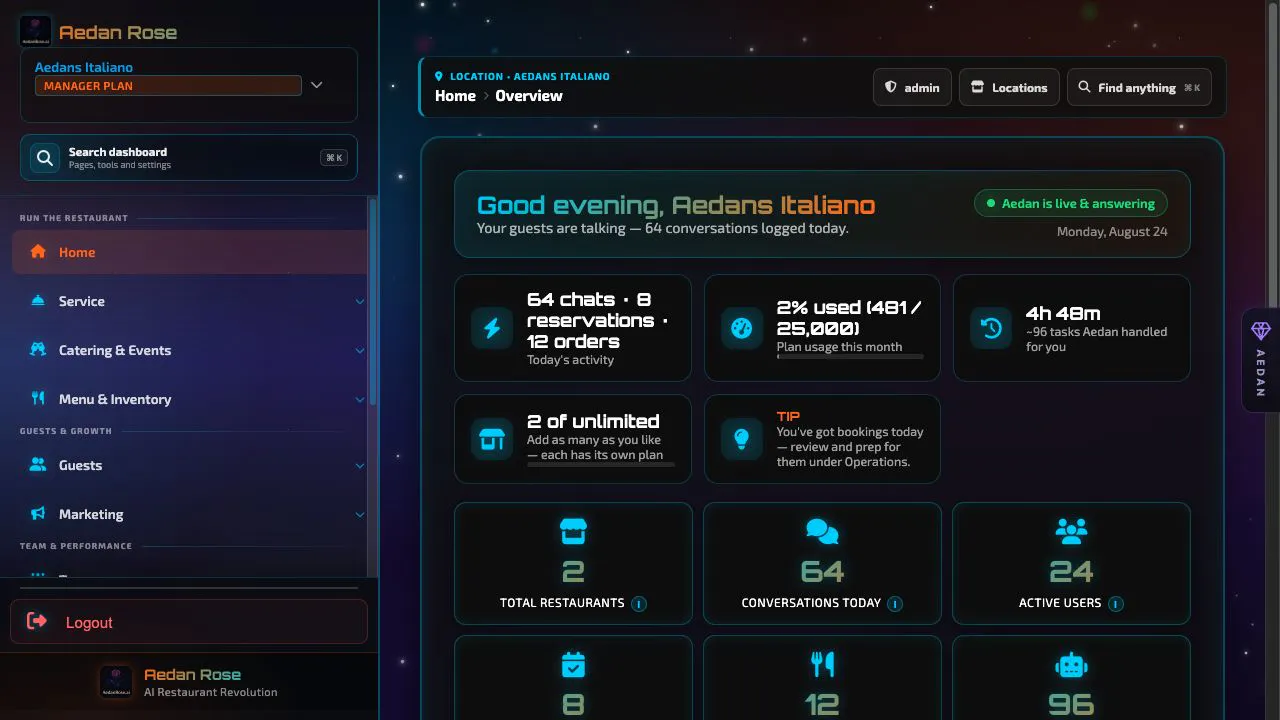
Four real screens from the product, not mockups.
How it works
You don’t have to rip anything out to start. The path is deliberately small at the front and only widens if the first step earns it.
We look at what a guest and an AI assistant can find about you online: menu, hours, booking and ordering paths. No account, no card, about two minutes.
You get specific observations in priority order: what’s missing, what it affects, and why it matters. We don’t hand you a vanity number.
The free plan is $0 and takes about 10 to 15 minutes to set up: menu, profile, payments, widget. Fix the single highest item and stop there if you want.
Orders, reservations, deposits, VIP spend, sales tax and Stripe payouts total up on one screen, so you can tell whether the fix moved anything.
Re-run the free site audit whenever you want. Plans with Guest Marketing add a weekly review of your own operating data. You upgrade when an item needs a paid feature, not on a calendar.
A side-by-side of the day-to-day difference, based on what the platform does, not on projected results.
Where the gaps show up
Missed calls, abandoned online orders, a table nobody followed up on. Each one happens in a different tool, so nobody sees the pattern.
Illustration, not a product recording.
Separate tools for orders, reservations and analytics, with no shared view.
Orders, analytics and AI conversations in a single dashboard.
You cannot see performance or guest behaviour as it happens.
Live analytics, conversation monitoring and revenue tracking.
Staff field the same enquiries during your busiest hours.
The assistant handles routine questions and takes orders at any hour.
Orders, deposits and VIP spend sit apart and never total up.
Each order, deposit and VIP charge tracked in one live total.
Problems surface only once they have already cost you money.
Reservations, orders and staffing together, with a weekly review of your own data.
You don’t have to start over
Most restaurant software asks you to replace your whole stack on day one. You can run Aedan Rose alongside what you already have and only consolidate the pieces that are actually costing you something.
The guest widget and the order page embed into any site: Wix, Squarespace, WordPress, a custom build. You paste one snippet. Nothing gets rebuilt.
Payments run through your own Stripe account via Stripe Connect. Money goes to you directly. Our 3% AI service fee is added at checkout and paid by the guest.
Connect Slack, Google Sheets, Microsoft Excel, Wix, Squarespace, GitHub or a plain webhook, and the AI can read and write to them on your behalf.
We don’t plug into your POS, your accounting software, or the delivery marketplaces. If a claim like that matters to your decision, we’d rather you know now than find out after you’ve signed up.
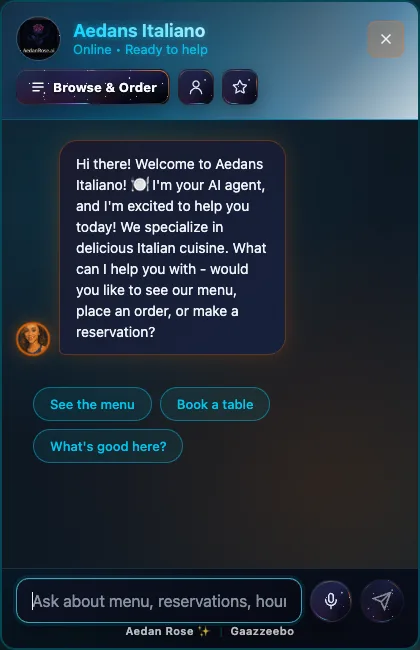
Experience Aedan Rose in action. This is connected to our real backend and powered by advanced Aedan Rose AI technology.
Try asking: "What's your most popular dish?" or "Can I make a reservation for tonight?"
Orders, reservations, deposits and VIP spend roll into one live view, so you always know exactly where the money is, without exporting a thing.
It answers guests, books tables, takes orders and follows up 24/7. Every single action lands in one auditable log, so you can see exactly what it did while you slept.
A live map of your restaurant, showing tables, patio, bar and VIP sections, updating in real time as the AI seats guests and takes bookings. No paper chart, no guessing what’s open.
Aedan Rose remembers your guests: who your VIPs are, who is becoming a regular and who may be slipping away. Then it turns those signals into a clear next step.
With Guest Marketing, Aedan recommends the audience and timing, you preview and approve, and reporting shows what happened. Loyalty, guest groups, branded email and consent controls are built in.
The AI captures, confirms and reminds every booking, then upsells your best seats with deposit-backed VIP reservations. More covers on a slow night, more revenue from the room you already have.
One platform replaces 6 to 10 separate vendors
Reservations, online ordering, POS-grade analytics, CRM, loyalty, scheduling and a 24/7 AI, under one login, one bill.
We implement enterprise-grade security best practices to protect your restaurant's data
AES-256-CBC encryption for data at rest, TLS 1.3 for data in transit, argon2id password hashing
Firebase Authentication with custom tokens, 6-level role-based permissions, MFA support
PostgreSQL for transactional data, Firestore for real-time sync, automated backups
Stripe-powered payment processing with PCI DSS Level 1 compliance
Each restaurant has its own encryption keys for maximum security
Regular automated backups with Firestore real-time redundancy
Automatic logout and custom token authentication with Firebase
Secure API key management with rotation and access logging
Built on Google Cloud Platform and Firebase with enterprise-grade reliability
Full data deletion available on account closure with detailed report
We use AES-256 encryption, Firebase Authentication, and dual-database redundancy. Our infrastructure is built on Google Cloud Platform with automated backups to ensure your data is always safe and available.
The Aedan Rose app puts the whole operation in your hand: orders, reservations, your floor plan, the team schedule, VIP bookings, live revenue and AI chat. Run the room from anywhere, on iPhone, iPad and Android.
Covers, revenue and reservations, live the moment you open the app.


Built and tested features that work today. No fluff, no promises, just honest capabilities.
"I love talking to your customers." Aedan Rose is powered by 5 AI agents working as one intelligent team to have real conversations that convert.
"I check every table for conflicts before I book." Raguel captures bookings 24/7, sends automated confirmations and reminders, and keeps one calendar your whole team works from.
"I spot patterns you'd miss." Remiel is your super genuine, helpful data expert who reveals hidden revenue opportunities.
"I keep your team running smoothly." Michael is your AI team leader who handles scheduling, task management, group chat, and team coordination.
"I know every dish by heart." Raphael is your AI menu healer and guide, helping customers find the perfect meal.
"I keep pricing transparent." Gabriel delivers clear, honest pricing with no hidden fees, no contracts, and no surprises.
"I know exactly where to seat every guest." Design your dining room once, then let Aedan Rose route every reservation to the right table: indoor, outdoor, VIP, and everything in between.
Most platforms force every location onto the same plan tier. Aedan Rose doesn't. Run your flagship on Manager, your café concept on Online Ordering, and your new pop-up on Free, each with its own quota, billing line, and team. Pay only for the features each location actually uses.
Each restaurant in your group sits on the plan that fits its revenue, headcount, and guest volume. A 200-cover steakhouse needs Manager. The neighbourhood wine bar doesn't. Pick what each location earns. No all-or-nothing math.
Conversations, AI model access, employee seats, email volume, menu uploads: every limit is scoped to the location that consumes it. High-traffic flagships never get throttled by quiet sibling sites, and quiet sites never overpay for capacity they won't use.
Switch between locations from a single owner dashboard. Each restaurant has its own employees, schedules, menus, reservations, and data, fully isolated, billed independently, but a single click away.
Here's how a four-location operator could mix tiers under one account:
Compare that to legacy platforms that would force all four onto a single enterprise contract, and bill you for capacity three of them never touch.
Three plans, one promise. Start free. Every new restaurant gets 30 days of the full Manager plan, free. After the trial: upgrade, or stay on the free order-only plan (guests browse your menu and order; you keep getting paid).
Answer guests around the clock.
It’s 9:40 on a Tuesday. Someone’s on your site, ready to order. This plan is why they don’t leave.
Run the whole restaurant.
The schedule, the stock, the regulars who stopped coming: one login instead of six subscriptions.
Your AI runs operations.
Included with Manager: an AI that doesn’t just answer. It works your dashboard for you. It reads live restaurant data, builds a plan, and carries out the work under your approval rules. 280+ verified operator tools, with Copilot usage included, no surprise AI bills.
Tell Aedan what the restaurant needs in plain English. It finds the right information, prepares the work and follows your approval rules.
Build schedules, cover gaps, handle time off, catch timeclock issues and prepare payroll.
Manage orders, reservations, tables, floor plans, VIP sections, check-ins and payment links.
Update menus and prices, monitor inventory, forecast stock and spot operational leaks.
Spot VIPs and lapsed regulars, build the right audience and prepare personalized, branded campaigns.
Turn revenue, traffic, feedback and competitor data into a prioritized list of useful actions.
With your permission, update Slack, Sheets, Excel, commerce and development workflows, or trigger Zapier automations.
All plans can be customized with add-ons to fit your exact needs
Scale your AI capacity
Increase email capacity
Your whole staff on the apps: scheduling, chat, time clock
Add as many locations as you want, each with its own plan
Stack as many as you need. Every plan supports unlimited add-ons: scale conversations and emails à la carte, no upgrade required. Team members and locations are never a fee: unlimited staff on every plan with team tools, unlimited locations each on its own plan.
See exactly what you get with each plan - no hidden features
Each of these is something the platform records automatically, so it ends up somewhere you can see it instead of in someone’s memory.
Owners often run the day on open questions. These are the ones Aedan Rose answers from your own data.
Everything you need to know about Aedan Rose and how it works
Our team is here to help you find the perfect solution for your restaurant.
No technical skills required - just 4 easy steps
Just drop your existing PDFs - no typing or data entry required
Drag & drop your files here
Prices & descriptions
Hours, story & policies
Watch as Aedan Rose learns your menu, brand, and policies in minutes
Training AI on your documents... 75%
Most powerful option - full customization and features
<script src="https://aedanrose.ai/widget.js"
data-restaurant-id="your-id"
data-primary-color="#667eea">
</script>
Simplest option - works everywhere, no technical knowledge needed
<iframe
src="https://aedanrose.ai/chat/your-id"
width="100%"
height="600px"
frameborder="0">
</iframe>
Choose your platform for step-by-step installation instructions
Most popular CMS
All-in-one platform
Drag & drop builder
E-commerce platform
Simple site builder
Website Builder
Use Script Embed
Go to your website URL followed by /wp-admin (e.g., yoursite.com/wp-admin) and log in with your administrator credentials.
In the left sidebar, hover over "Appearance" and click "Theme Editor"
On the right sidebar, look for "Theme Files" and click on footer.php
Use Ctrl+F (or Cmd+F on Mac) and search for </body> in the file
<!-- Other footer code above -->
<script src="https://aedanrose.ai/widget.js" data-restaurant-id="your-id"></script>
</body> ← Paste ABOVE this line
Place your cursor on a new line JUST ABOVE </body> and paste the Aedan Rose widget script
Scroll to the bottom and click the blue "Update File" button to save your changes
Open your website in a new tab. Within 5-10 seconds, you should see the Aedan Rose widget appear in the bottom-right corner.
Widget not appearing? Clear your browser cache (Ctrl+Shift+R) and refresh the page.
Still not working? Check if there are any JavaScript errors in the browser console (F12 key).
Go to squarespace.com and log in to your account, then click on your website
In the left sidebar, click the gear icon or "Settings" link at the bottom
Click on "Advanced" in the settings menu, then select "Code Injection"
You'll see two boxes: "Header" and "Footer". Paste your Aedan Rose widget code in the Footer box
Click the "Save" button in the top-right corner of the page
Click "View Site" or open your website in a new tab. The widget appears instantly - no publishing needed!
Don't see Code Injection? You need to upgrade to a Business plan or higher.
Widget not showing? Wait 30 seconds and hard refresh (Ctrl+Shift+R).
Log in to Wix and click "Edit Site" on your restaurant's website
On the left sidebar, click the large "Add" button (+ icon)
Scroll down and click "Embed" then choose "Custom Embeds"
Click the "Embed a Widget" option (looks like a code icon)
A box will appear. Click "Enter Code" and paste your Aedan Rose widget script in the "Add your code here" field
Drag the widget element to the bottom-right corner of your page. You can resize it if needed.
Click "Publish" in the top-right corner to make the widget live
Widget looks broken? Make sure you chose "Embed a Widget" not "Embed HTML".
Can't see the widget? Check that you published your site and cleared your cache.
Go to your Shopify admin dashboard at yourstore.myshopify.com/admin
In the left sidebar, click "Online Store" then click "Themes"
Find your current theme (under "Current theme"), click the "Actions" dropdown, and select "Edit code"
In the left sidebar under "Layout", click on theme.liquid
Press Ctrl+F (Cmd+F on Mac) and search for </body>
<!-- Other Shopify code -->
<script src="https://aedanrose.ai/widget.js" data-restaurant-id="your-id"></script>
</body> ← Paste ABOVE here
Click on the line just ABOVE </body> and paste your Aedan Rose widget script
Click the green "Save" button in the top-right corner
Click "View your store" or open your live store in a new tab to see the widget
Widget not appearing? Make sure you edited the CURRENT active theme.
Broke your theme? Restore from the backup you created in step 3.
Go to weebly.com and log in, then select your restaurant website
In the top menu, click the "Settings" tab
In the left sidebar, click on "SEO"
Scroll down until you see the "Footer Code" section
Click in the Footer Code text box and paste your Aedan Rose widget script
Click the "Save" button at the top or bottom of the page
Click the "Publish" button in the top-right corner to push your changes live
Widget not showing? Make sure you clicked Publish, not just Save.
Still having issues? Try clearing your browser cache and refreshing.
Go to godaddy.com and sign in to your account
Click "My Products" → "Websites + Marketing" → "Edit Website" or "Edit Site"
Go to the page where you want the widget to appear (usually your homepage or all pages)
Click the "Add Section" button (usually a + icon) and choose "HTML" from the options
An HTML editor will appear. Paste your Aedan Rose widget script in the code editor
Drag the HTML section to the bottom of your page (footer area) for best results
Click "Publish" in the top-right corner to make your widget live
Can't find HTML option? GoDaddy may call it "Custom Code" or "Embed" - look for those.
Widget not appearing? Make sure you published (not just saved as draft).
One-click Stripe setup to accept payments through your AI assistant
Connect with Stripe
Click Connect
Authorize Stripe
Start Accepting Payments
Get Aedan Rose up and running in minutes. Setup is easier than making coffee.
Setup in minutes, not hours. We're confident you'll love it.
About 2 minutes to set up. Your AI team member starts answering guests the moment you finish.
It costs nothing, needs no account, and tells you something useful about your restaurant whether or not you ever become a customer.
Free plan is $0 with no credit card. The audit reads your public web presence only. Never your POS, margins or bank data.